Vendor: BENQ
SKU: 08752149

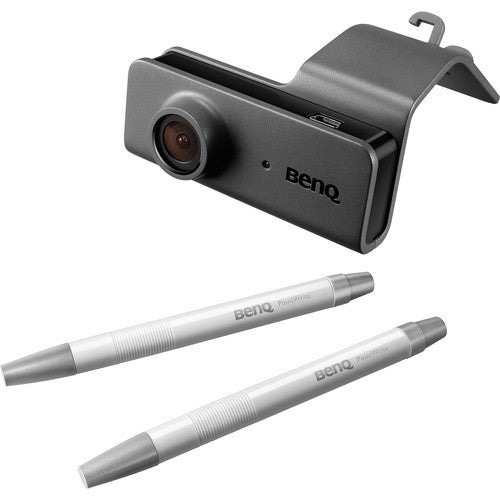
BenQ PointWrite Pen Kit | PW02

$251.00
$261.00
$251.00
(-4%)
(VAT Included)
Subtotal: $251.00

beirutcart.com is an authorised online retailer operating 3 branches across Lebanon — Zalqa, Beirut Salim Salam, and Centro Mall.

  • beirutcart.com is responsible for order processing, invoicing, and delivery.
  • beirutcart.com provides full customer support at all times.
  • Refunds and replacements handled per our Return Policy.

We only deal in original products from trusted brands. Every item is carefully checked for authenticity and comes with warranty — ensuring you get the quality and reliability you deserve.

🚚 Free delivery to all Lebanese districts — no minimum order required.

Your order may be fulfilled from multiple distribution centers. Available items may be shipped immediately and could arrive in separate shipments.

In the event of stock unavailability or delays, our team will contact you within 24 hours with an update and alternative options.

If you selected showroom pickup, our team will contact you within 24 hours to confirm the exact BeirutCart branch where your order will be ready for collection — depending on product availability across our 3 locations (Zalqa, Beirut Salim Salam, Centro Mall).

⚠️ Please do not visit any branch before receiving confirmation. For urgent enquiries, reach us on WhatsApp at +961 76 666 624.

Returns must be initiated within 3 days of receiving your order. Contact our team to obtain a Return ID before shipping any item back.

For full details, please read our Return Policy. Our team is always available to assist you through the process.

BenQ PointWrite Pen Kit | PW02

BenQ PointWrite Pen Kit | PW02

$261.00 $251.00

BenQ PointWrite Pen Kit | PW02

$261.00 $251.00

BenQ PW02 PointWrite Pen Kit

The BenQ PW02 PointWrite Pen Kit includes everything you need to turn your projected image surface into an interactive whiteboard. It is designed to keep students engaged by bringing interactive and touch solutions to a new level of simplicity, ease, and control.

BenQ's PointWrite technology features multi-person collaboration, allowing up to four students to work simultaneously. With its one-second auto calibration and fast writing response time, BenQ PointWrite is positioned as an effortless device to set up with the BenQ ultra short-throw projector and promises a smooth, seamless writing experience.

BenQ's PointWrite Interactive Technology

BenQ's PointWrite interactive projectors turn any surface into an interactive whiteboard by utilizing infrared technology to detect light emitted from a PointWrite Pen or a PointWrite touch module, which enables the camera to detect the finger or object movements. This allows teachers to invite students up to the board to make notes, answer questions, or collaborate on digital paintings, sparking creativity, imagination, and fun.

Foster Active Learning Through PointWrite Interactivity and Classroom Collaboration

BenQ's PointWrite technology is designed to keep students involved and engaged by letting multiple students contribute at once.

Dual Screen with Multiple Touch Capabilities

The multi touch capabilities, which can support Windows 8 touch interface, are enabled by the QWrite software to allow teachers to have students collaborate and generate ideas together using one big screen. Dual screen projection will also allow you to multi-task with videos or writing, and annotate on the big screen.

Easy Installation & Quick Set-up

PointWrite is designed for easy installation and mounting, and takes only one second for auto calibration.

Fast Writing Response Time

The BenQ PointWrite requires a maximum 0.016-second writing response time, which is designed to ensure an ultra smooth, interruption-free writing experience for teachers and students.

Maximixing Class Participation with QWrite

The Qwrite software enables multi-user on-screen collaboration with annotation tools to edit, highlight, and co-create various documents together. All the work created can be saved as a Qwrite file or as a JPEG, PNG, or BMP file on your computer. There is also the option to make video and screen recordings of your lessons for easy sharing. Additionally, you can import and upload images from your computer by creating a shortcut to access the local storage.

Freely Shared Resources

Write on or edit the projected document, with QWrite's free built-in image folders created on your computer. Every image creation can be saved for later sharing.

Related Products

Recently Viewed Products